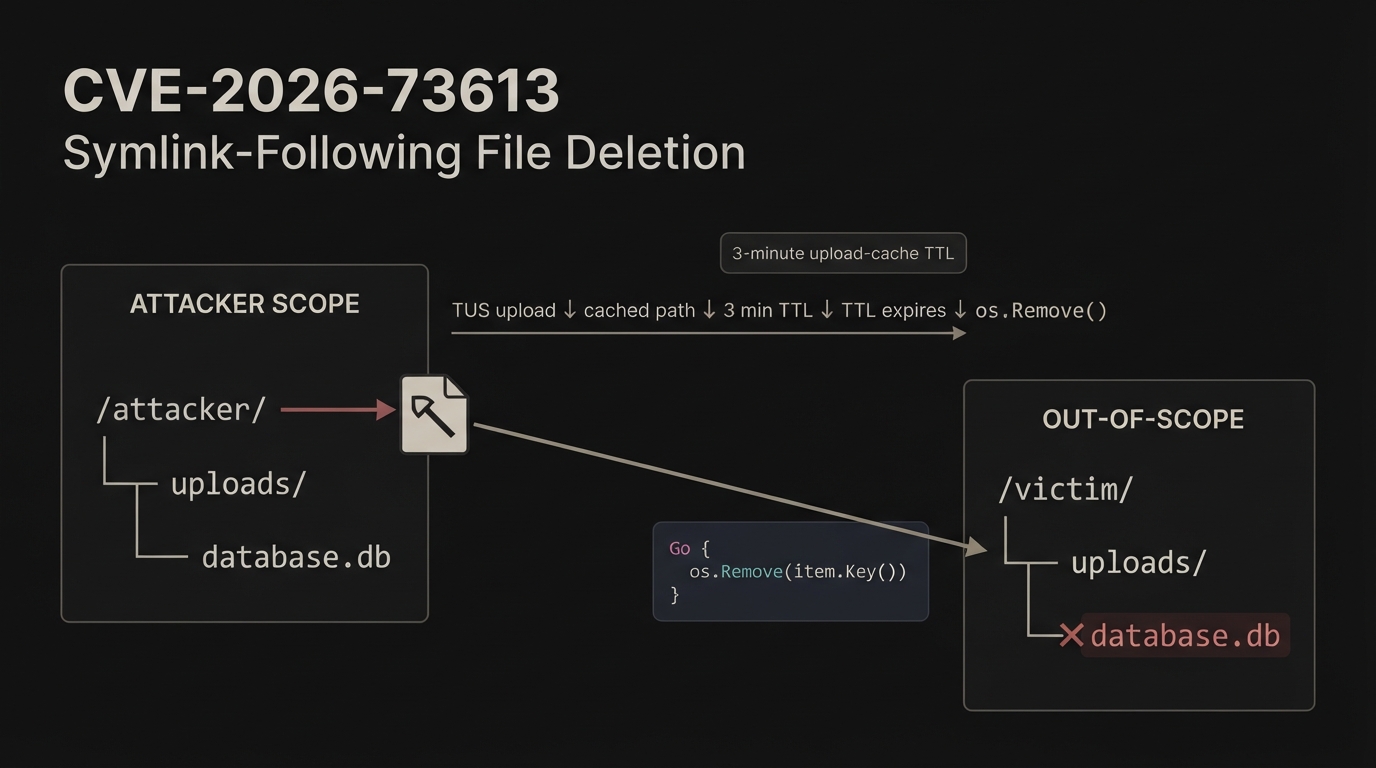
For this blog, we’ll look at CVE-2026-73613: Out-of-scope file deletion via symlink-following delete in TUS upload-cache eviction and trace it back to the source code to understand exactly where the vulnerable behavior comes from and how it can lead to file deletion outside the intended directory.
We have 3 keywords in the title:
Out-of-scope file deletionsymlinkTUS upload-cache eviction
1. Out-of-scope file deletion
This one is pretty simple. Consider the following scenario:
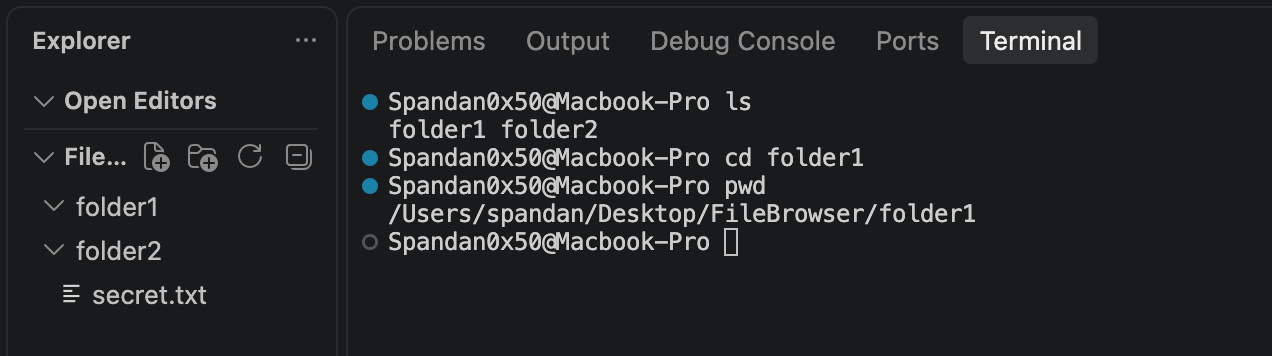
Say I’m currently in /Users/spandan/Desktop/FileBrowser/folder1, and have privilege only within /folder1/*.
Here, out-of-scope file deletion would simply mean me somehow managing to escape the boundary, go to FileBrowser/folder2 and delete the file secret.txt.
In my case, since I have full privileges on my machine, that’s just:
rm ../folder2/secret.txt
But in the File Browser case, we don’t have such privileges.
2. Symlink
This is very similar to creating a shortcut in Windows, but in a Linux environment. We call it a symbolic link (or symlink).
Consider this:
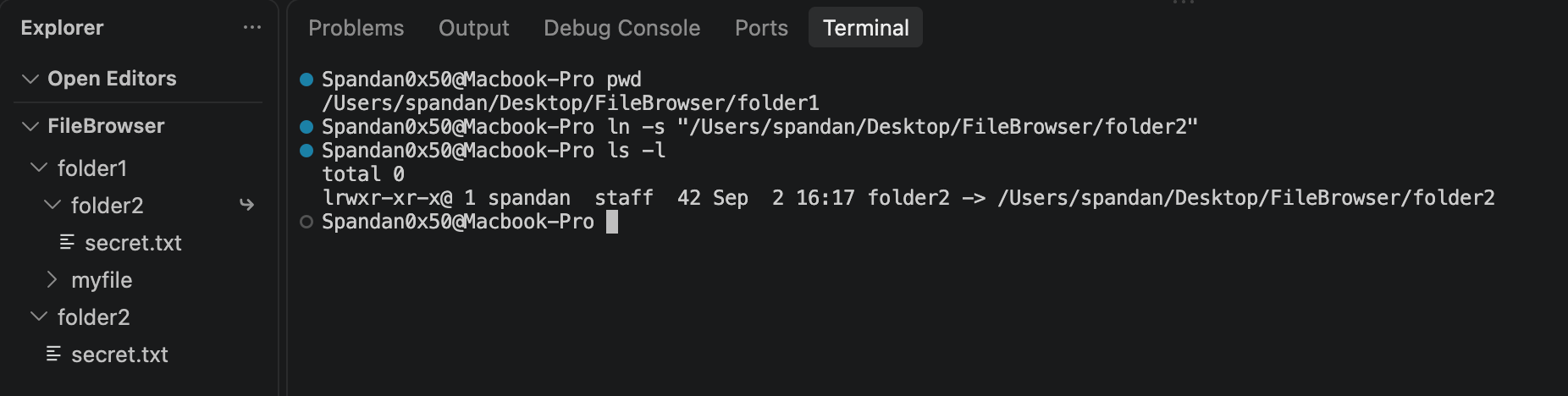
So within /Users/spandan/Desktop/FileBrowser/folder1, I’ve created a shortcut pointing to /Users/spandan/Desktop/FileBrowser/folder2 using the ln -s <path> command, and you can also see the file secret.txt that was inside /folder2.
A question that you may be thinking of here is: what if I create a shortcut pointing to a directory that exists but I don’t have access to?
It’s pretty simple: you can obviously create a shortcut, but you’ll get an error if you try to do cd shortcut, you won’t be allowed to view the files inside it or delete them.
One more point here is: if you’re on a machine with full privileges, and create a shortcut, and then do rm -rf on the shortcut itself, i.e. /Users/spandan/Desktop/FileBrowser/folder1/folder2/, then you’ll actually be deleting the shortcut, rather than deleting the original folder folder2/ or contents inside it.

But if you create a shortcut, say the same example: within /Users/spandan/Desktop/FileBrowser/folder1/, you create a folder pointing to /Users/spandan/Desktop/FileBrowser/folder2/.
If you then explicitly reference the path as /Users/spandan/Desktop/FileBrowser/folder1/<symlink>/secret.txt, you can access it; then you can delete the file inside folder2, even though the symlink itself resides within folder1.
package main

import (
	"fmt"
	"os"
)

func main() {
	path := "/Users/spandan/Desktop/FileBrowser/folder1/folder2/secret.txt"

	err := os.Remove(path)
	if err != nil {
		fmt.Println(err)
	}

	fmt.Println("Deleted!")
}
This deletes the file /folder2/secret.txt.
That’s a symlink.
3. TUS upload-cache eviction
You may have never realized it, but you use this almost every single day. Say you’re uploading a 5GB file to an AWS S3 bucket or Google Drive, and halfway through, your internet suddenly goes off. When you come back online, instead of needing to reupload the entire 5GB file from the beginning, you can continue from where you actually left off.
So, how does an AWS bucket work here? You try to upload a 5GB file, the backend looks at the metadata, internally communicates with the bucket using those details, and then the bucket responds with multiple presigned URLs, which the backend gives back to the client. The client then uploads a small chunk of the 5GB file on each presigned URLs.
Say you were on the 43rd chunk and suddenly your internet goes off. You can then resume the upload from the 43rd chunk, and eventually, everything will be merged on the bucket’s end.
That’s essentially what TUS is: a protocol for resumable uploads.
Coming back to the title, Out-of-scope file deletion via symlink-following delete in TUS upload-cache eviction, we can actually guess what’s happening here:
- An attacker with low privileges creates a symlink pointing to a file or folder that they don’t have access to.
- Somehow, by using TUS, they are able to force the higher-privileged system to follow the symlink and delete the file pointed to by it, which is obviously outside the attacker’s boundary.
The vulnerable code:
const uploadCacheTTL = 3 * time.Minute
func newMemoryUploadCache() *memoryUploadCache {
	cache := ttlcache.New[string, int64]()
	cache.OnEviction(func(_ context.Context, reason ttlcache.EvictionReason, item *ttlcache.Item[string, int64]) {
		if reason == ttlcache.EvictionReasonExpired {
			fmt.Printf("deleting incomplete upload file: \"%s\"\n", item.Key())
			os.Remove(item.Key())
		}
	})
	go cache.Start()
	return &memoryUploadCache{cache: cache}
}
That’s the main vulnerable code, but the entire context is: so, there’s a function tusPostHandler() that processes HTTP upload request and constructs file object; file.RealPath() gives the corresponding path, and is passed to cache.Register, which ends up calling:
func (c *memoryUploadCache) Register(filePath string, fileSize int64) {
	c.cache.Set(filePath, fileSize, uploadCacheTTL)
}
Say the filePath is filebrowser/user/x/upload/test.txt & fileSize=12345, and on top of that, this is a resumable upload as we have const uploadCacheTTL = 3 * time.Minute. So the cache is something like:
┌──────────────────────────────────────────────────┐
│ Cache                                            │
├──────────────────────────────────────────────────┤
│ "/srv/.../test.txt" → 12345                      │
│                                                  │
│ expires in: 3 minutes                            │
└──────────────────────────────────────────────────┘
The point is, after the 3-minute TTL expires due to incomplete upload, the server is supposed to delete the incomplete chunks & what makes it vulnerable is
	cache.OnEviction(func(_ context.Context, reason ttlcache.EvictionReason, item *ttlcache.Item[string, int64]) {
		if reason == ttlcache.EvictionReasonExpired {
			fmt.Printf("deleting incomplete upload file: \"%s\"\n", item.Key())
			os.Remove(item.Key())
		}
	})
the code simply checks if the TTL has expired, and once it expires, it triggers OnEviction(...) which then performs os.Remove() on item.Key() which is simply file.RealPath(), which is the same path that was originally registered.
So the attack flow here would be:
Attacker: starts a file upload `POST /attacker/uploads/database.db`
        │
        │  absolute filesystem path is stored in cache i.e., on `file.RealPath()`
        |  TTL 3 minutes starts
        ▼
Attacker drops the full file upload, replaces `/attacker/` with a symlink pointing to `/victim/`
        │
        │ waits for 3 minutes
        ▼
TTL expires, leading to `OnEviction()`
        │
        │ os.Remove(/attacker/uploads/database.db)
        ▼
Kernel follows the symlink on `/attacker/`, and resolves it to `/victim/uploads/database.db`.
The automatic deletion is primarily for abandoned/incomplete uploads, however using os.Remove() is risky because kernel follows the symlink.
The vulnerability was patched on version 2.63.19 on 9bd79c3aaeb4a55b0e69cf8976c4a258db2f5e06 commit ID, and they added a scope validation via return d.user.Fs.Remove(uploadPath). So, instead of:
3 minutes later
        |
        ▼
os.Remove("/some/path")
it became:
3 minutes later
        |
        ▼
callback()
        |
        ▼
d.user.Fs.Remove(uploadPath)
        |
        ▼
ScopedFs authorization/path validation
        |
        ▼
delete only if still allowed
That was CVE-2026-73613 reported by manus-use. Thank you for reading.